CUCM Upgrades tend to include device firmware upgrades in every instance I’ve encountered. This causes some superfluous downtime as once the upgrade finishes, even if you plan it in a non-impacting way, phones will upgrade to the new firmware. There are a couple options to avoid this, scheduling a window prior to the upgrade to upgrade the device firmware or preventing the firmware upgrade all together. In my case, I only upgrade device firmware if there is a new feature I want or a bug I need fixed, otherwise, i don’t touch firmware. To avoid this, I record what firmware is in use, perform the publisher upgrade, restore the firmware to what it was prior to the upgrade, then continue with the subscribers. Let’s get into how I do this.
First, as with all of my CUCM Informix posts, you need the data dictionary. You can find it here or if you need older versions, you can look at GitHub. Leveraging the data dictionary, we can easily see two relevant columns, inactiveloadinformation and loadinformation under the defaults table. We can also see this table has tkmodel which from prior examples, we know can be linked to the table TypeProduct to get the actual device model. Let’s start with a query to get the device model and firmware.
run sql select d.loadinformation, d.inactiveloadinformation, tp.name from defaults as d INNER JOIN TypeProduct as tp ON d.tkmodel = tp.tkmodel
PKID, as usual, is going to be our unique ID of a device and our primary key for the table. tkmodel is a column that we will use for our inner join with the TypeProduct table so we can get the actual device name. loadinformation is pretty clear, it will provide the current load while inactiveloadinformation is the inactive load. This query will result in some data like shown below (note, this is taken from a CUCM 12.5 instance)
loadinformation                     inactiveloadinformation    name
=================================== ========================== ===========
sip78xx.14-1-1-0001-136             sip78xx.12-7-1-0001-393    Cisco 7811
sip8821.11-0-6SR2-4                 sip8821.11-0-5SR1-4        Cisco 8821
sip88xx.14-1-1-0001-125             sip88xx.12-7-1-0001-393    Cisco 8811
sip8845_65.14-1-1-0001-125          sip8845_65.12-7-1-0001-393 Cisco 8845
sip8845_65.14-1-1-0001-125          sip8845_65.12-7-1-0001-393 Cisco 8865
Here is a screenshot to show the info matches (the ordering is a little different, so filter with your mind)
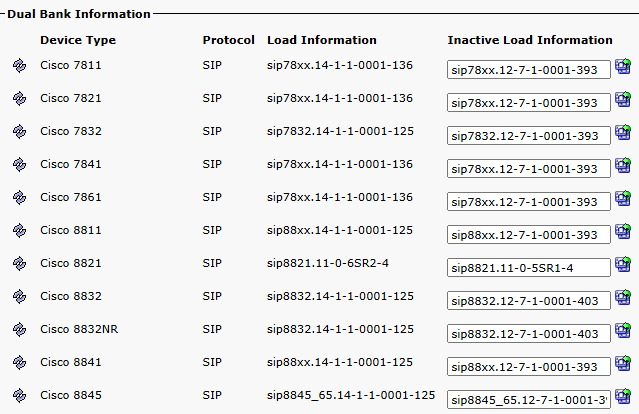
So, how is this useful? well, because we have no bash shell or anything, we need to take this data into an editor of some sort, and we don’t need it to be pretty-fied, so we do not need actual phone model names. Instead, we’ll get the raw data using run sql select tkmodel, loadinformation, inactiveloadinformation from defaults and once again, i will truncate this output for space and convenience. We have some output like shown below
tkmodel loadinformation             inactiveloadinformation
======= =========================== ==========================
36213   sip78xx.14-1-1-0001-136     sip78xx.12-7-1-0001-393
36216   sip8821.11-0-6SR2-4         sip8821.11-0-5SR1-4
36217   sip88xx.14-1-1-0001-125     sip88xx.12-7-1-0001-393
36224   sip8845_65.14-1-1-0001-125  sip8845_65.12-7-1-0001-393
36225   sip8845_65.14-1-1-0001-125  sip8845_65.12-7-1-0001-393
537     sip9951.9-4-2SR4-1
Note, that I added in the 9951 also, specifically because it is not a dual-load phone, so there is no inactive firmware. I took this data and put it in a spreadsheet, you can likely guess where I’m going with this, but we can use formulas to create our SQL update string. See how I did this below. note, that i also show the formula used, but I’ll add it here as well =CONCATENATE("run sql update defaults set ",$B$1, " = '",B2, "', ", $C$1, " = '",C2, "' where ",$A$1," = ",A2).

At this point, you’re ready to perform the upgrade and restore the firmware settings. To keep things efficient, you would filter out any device models you do not use and only reset firmware for things in your organization. Bear in mind, as always, you bypass ALL checks in the system when you interface directly with SQL. Run these commands in your LAB environment before testing in production. I accept no responsibility for any issues caused, but I do note that I use this during my upgrades without issue. As you can see below, there is obviously no firmware with the word “TEST” in it, but I am able to update it to this false string, which would definitely cause some issues in the system.
admin:run sql update defaults set loadinformation = 'sip78xx.14-1-1-0001-TEST', inactiveloadinformation = 'sip78xx.14-1-1-0001-136' where tkmodel = 36213
Rows: 1
admin:run sql select tkmodel, loadinformation, inactiveloadinformation from defaults where tkmodel = 36213
tkmodel loadinformation          inactiveloadinformation
======= ======================== =======================
36213   sip78xx.14-1-1-0001-TEST sip78xx.14-1-1-0001-136
Point being, pay attention, validate your work, and ensure you have backups.
I hope this is useful information, have fun!